PBR Map Generator
Extract individual PBR maps from photos or texture images. Generate normal, roughness, height, ambient occlusion, metallic, or depth maps one at a time.
The PBR Map Generator extracts a single PBR map type from any uploaded photo or texture image. Upload your image, pick the map type you need, and the AI generates it.
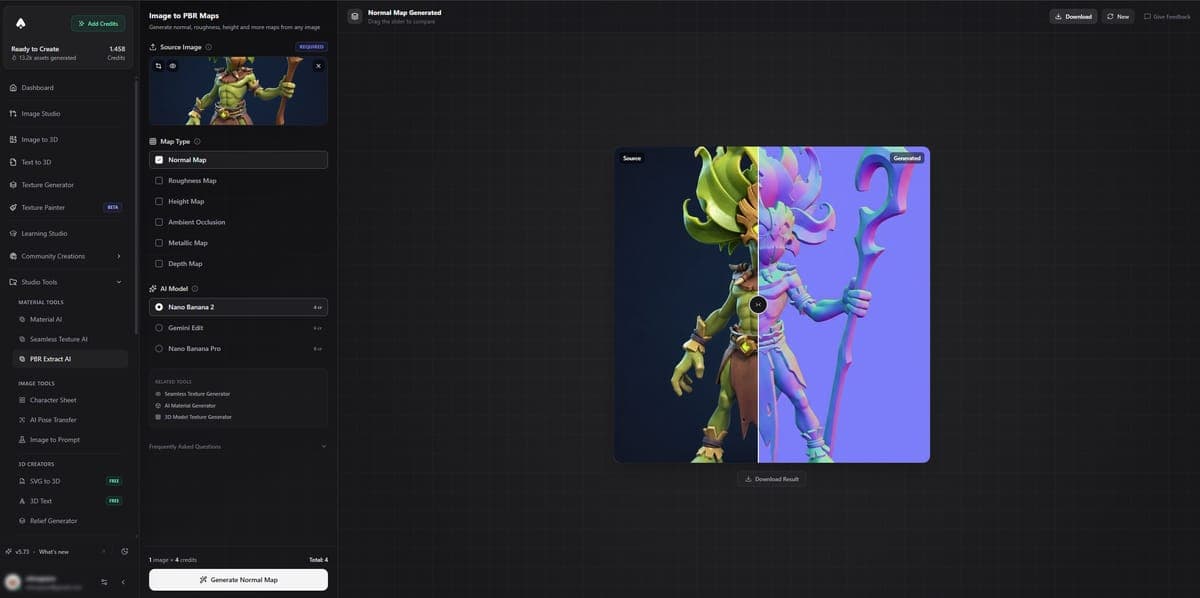
Map Types
| Map | What it generates |
|---|---|
| Normal | Surface detail for realistic lighting |
| Roughness | Matte vs glossy areas |
| Height / Displacement | Depth for parallax and displacement mapping |
| Ambient Occlusion | Crevice and cavity shadows |
| Metallic | Metal vs non-metal regions |
| Depth | Foreground/background distance map |
AI Models
| Model | Credits | Resolution |
|---|---|---|
| Nano Banana 2 | 4 | 1K |
| Gemini Edit | 6 | 1K |
| Nano Banana Pro | 8-16 | 1K, 2K, 4K |
Higher resolution options cost more credits. 4K resolution is available on paid plans only.
How to Use
- Upload a photo or texture image
- Select the map type you want (normal, roughness, height, etc.)
- Pick an AI model based on your quality and resolution needs
- Click generate
- Preview the result with the before/after slider
- Download the map
Difference from Material Generator
These two tools serve different purposes:
- PBR Map Generator extracts ONE map at a time from a photo or existing texture. Use it when you need a specific map from an image you already have.
- Material Generator creates a FULL SET of maps (base color, normal, roughness, metalness, height) from scratch or from a description. Use it when you need a complete material.
If you have a texture and just need a normal map from it, use PBR Map Generator. If you want to create an entire material from a text prompt, use Material Generator.
Access
Free users can generate maps using their credits. Downloads are locked to paid plans. 4K resolution requires a paid plan.
Related Tools
- Need a complete material set from scratch? Use the Material Generator instead
- Want tileable textures for game environments? Try the Seamless Texture Generator
- Apply extracted maps to a 3D model with the Texture Painter
- Generate 3D models to texture with Image to 3D or Text to 3D
Frequently Asked Questions
Yes. Upload any photo or texture image to the PBR Map Generator in 3D AI Studio, select "Normal" as the map type, and the AI extracts surface detail information into a proper normal map. It works with photos of real surfaces, hand-painted textures, or any flat image.
Resolution depends on the AI model you choose in 3D AI Studio. Nano Banana 2 and Gemini Edit output at 1K resolution. Nano Banana Pro offers 1K, 2K, or 4K, with higher resolutions costing more credits. 4K resolution is available on paid plans only.
A single map extraction in 3D AI Studio costs 4 to 16 credits depending on the AI model and resolution. Nano Banana 2 is the cheapest at 4 credits for 1K. Nano Banana Pro at 4K is 16 credits. If you need all five PBR maps from one image, consider using the Material Generator instead, which creates the full set for 7 credits.
Yes. The PBR Map Generator in 3D AI Studio is designed exactly for this. Upload your existing base color texture, select "Roughness" as the map type, and the AI analyzes the surface to determine which areas should be glossy and which should be matte. The output is a grayscale roughness map ready for your shader.
In 3D AI Studio, the Height map type generates displacement data showing surface depth, useful for parallax mapping and tessellation in game engines. The Depth map type generates foreground-to-background distance information, more useful for compositing and post-processing effects. For texturing workflows, you typically want the Height map.
Use the PBR Map Generator in 3D AI Studio when you already have a texture and just need one specific map from it, like extracting a normal map from your base color. Use the Material Generator when you want to create a complete set of all five PBR maps from scratch or from a description.
Seamless Texture AI
Generate tileable PBR texture sets from text descriptions or images. All maps tile seamlessly with no visible seams or repetition artifacts.
Remesh Tool
Reduce the polygon count of a 3D model and rebuild clean quad or triangle topology. Compare four remesh providers, from free to AI retopology.