Model Spinner
Create 360-degree turntable videos from GLB models. Choose backgrounds, rotation speed, and export with alpha channel support.
The Model Spinner creates smooth 360-degree turntable videos from your 3D models. Upload a GLB file, customize the rotation, and download a video showing your model from every angle. It is free to use with no credits required.
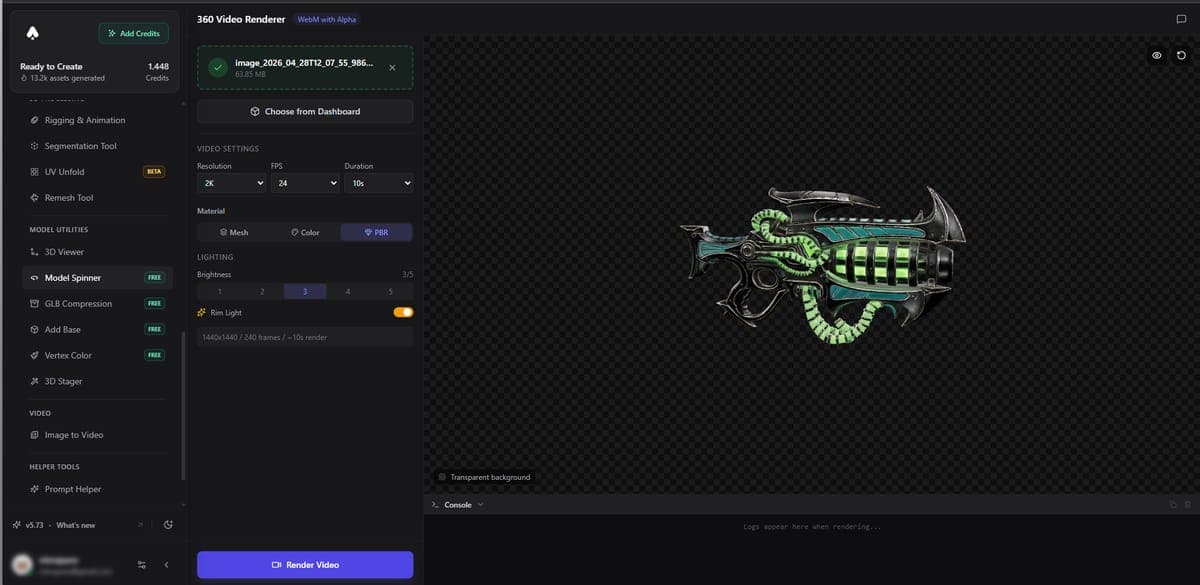
How to use
- Upload a GLB file or select a model from your Dashboard
- Set the rotation speed and direction
- Choose a background color or enable transparent background
- Click render and download your video
Options
Background - Pick a solid color, gradient, or transparent (alpha channel). Transparent backgrounds are useful when you want to composite the video over other content.
Rotation speed - Control how fast the model spins. Slower speeds work better for detailed models where viewers need time to appreciate the surface.
Camera angle - Adjust the vertical angle to show more of the top or sides of your model.
Output
The spinner renders an MP4 video file. When you choose a transparent background, the output includes an alpha channel so you can layer it in video editing software.
Related Tools
- Need AI-rendered product photos instead? Use the 3D Stager
- Want to view models interactively? Use the 3D Viewer
- Need to compress models before sharing? Try GLB Compression
- Generate models to showcase with Image to 3D or Text to 3D
Frequently Asked Questions
Upload a GLB file to 3D AI Studio's Model Spinner tool, set your preferred rotation speed and camera angle, choose a background color or transparent option, and hit render. The tool outputs a smooth MP4 video showing your model from every angle.
Yes. 3D AI Studio's Model Spinner supports alpha channel output. Select the transparent background option before rendering, and the resulting MP4 will have a clear background so you can composite it over any content in your video editing software.
The Model Spinner in 3D AI Studio is free to use with no credit cost. You can adjust settings and render as many videos as you need. A paid plan is only required if you want to download models from the Dashboard.
The Model Spinner exports MP4 videos. When you enable transparent background, the MP4 includes an alpha channel. 3D AI Studio renders the video directly in your browser, so you get the file instantly without waiting for server-side processing.