Format Conversion
Change any model in your 3D AI Studio library to GLB, GLTF, FBX, OBJ, STL, USDZ, 3MF or PLY in seconds. Costs 1 credit and keeps the original file.
Format Conversion turns any 3D model in your 3D AI Studio library into GLB, GLTF, FBX, OBJ, STL, USDZ, 3MF or PLY. Each conversion costs 1 credit, takes a few seconds, keeps the original file and does not change the mesh or textures.
| Cost | 1 credit per conversion |
| Time | A few seconds |
| Input | Any model in your dashboard |
| Output formats | GLB/GLTF, FBX, OBJ, STL, USDZ, 3MF, PLY |
| Quality loss | None, geometry and textures are repacked as they are |
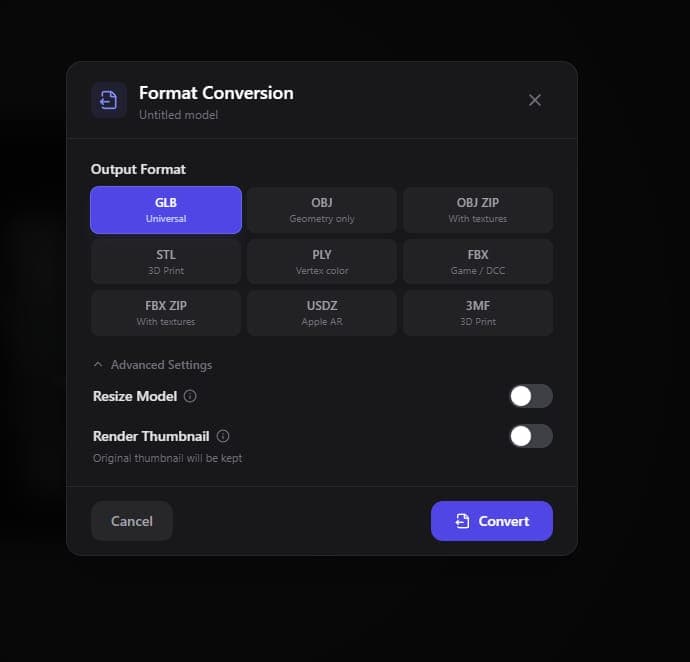
How do I change a model's format?
Open the model in your dashboard, choose Process → Change Format and pick FBX. The FBX appears on the model page next to the original GLB a few seconds later.
- Open the model from your Dashboard
- Click Process to open the model actions
- Select Change Format
- Choose FBX, or any other target format
- Download the new file from the model page
The same steps convert to OBJ, STL, USDZ, 3MF, PLY or back to GLB.
Converting a file that is not in your 3D AI Studio library? The free GLB to FBX converter runs in your browser with no signup, and the file never leaves your computer. The same 3D file converter handles GLB to STL, STL to 3MF, FBX to GLB and other format pairs.
Which format should I convert to?
Pick the format your destination expects: FBX for Unity and Unreal, GLB or OBJ for Blender, STL for single-color printing, 3MF for color printing and USDZ for AR on Apple devices.
| Destination | Format | Why |
|---|---|---|
| Unity, Unreal Engine | FBX | Native import with materials, rigging and animation |
| Blender | GLB or OBJ | GLB keeps textures in one file, OBJ works everywhere |
| Web viewers, Godot | GLB | Compact single file, the web standard |
| 3D printing, one color | STL | Accepted by every slicer |
| 3D printing, several colors | 3MF | Stores filament colors for AMS and MMU units (Export for 3D Printing) |
| iPhone, iPad, Vision Pro AR | USDZ | Opens in AR Quick Look |
| Point cloud or scan tools | PLY | Stores vertex colors |
The Export Formats guide compares every format in detail, including GLB vs FBX and STL vs 3MF.
Does converting reduce quality?
No. Conversion repacks the existing geometry and textures into the new format without changing them. To lower the polygon count or rebuild the topology, use the Remesh Tool, which can also export in a new format in the same step.
Can I convert several models at once?
Not yet. Conversions run one model at a time from the dashboard. Each one takes a few seconds, so converting a handful of models is still quick. To download many converted files together, use ZIP Export.
Related tools
- Remesh Tool: convert the format and reduce the polygon count in one step
- Export Formats: which format to use for each project
- Blender, Unity and Unreal Engine import guides
- Generate models to convert with Image to 3D or Text to 3D