ZIP Export
Bundle up to 50 images, 3D models, and videos into a single ZIP archive. Name your export, organize it into folders, and get an email when it's ready.
ZIP Export bundles any of your generations - images, 3D models, and videos - into a single downloadable archive. Instead of saving files one by one, select everything you need and download it as one ZIP.
Where you can export
From your Dashboard:
- Open your Dashboard
- Select the files you want (Ctrl-click for several, Shift-click for a range - selections work across pages)
- Click Export ZIP in the action bar
- Pick your options and start the export
From Flow:
- Add the Export ZIP node (Logic category) at the end of a workflow. Wire any results into it - single files, whole batches, or a Collect - and run the flow. When everything finishes generating, your ZIP is created automatically. Learn more about nodes
- Or use the Outputs panel: click the select button (or Ctrl-click any result) to pick up to 50 outputs and export them directly.
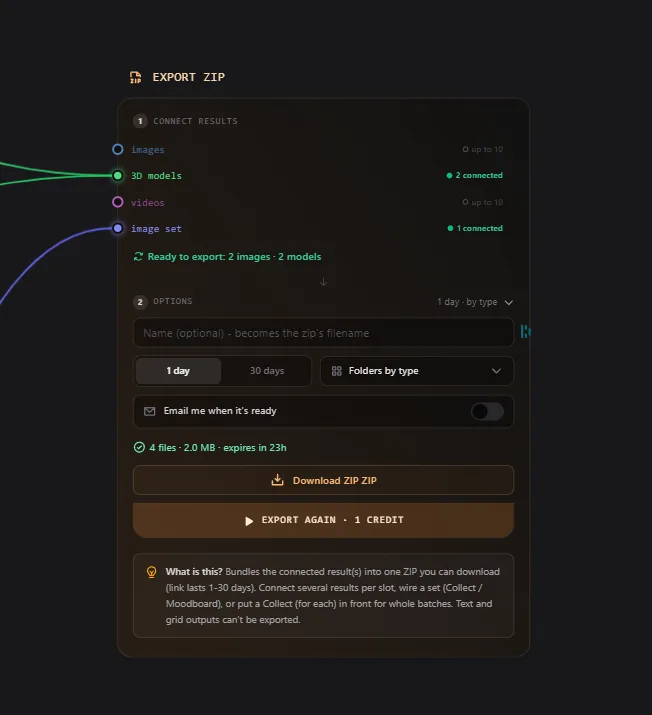
Export options
| Option | What it does |
|---|---|
| Name | Becomes the ZIP's filename (e.g. "Game assets pack.zip"). Optional. |
| Folders | Organize the archive: by type (2D / 3D / video), by file format (glb, png, ...), or by date. Default is no folders. |
| Link duration | How long the download stays available: 1 day (default) or 30 days. |
| Email me | Get an email with the download link the moment your export is ready - handy for larger exports. |
Tracking your exports
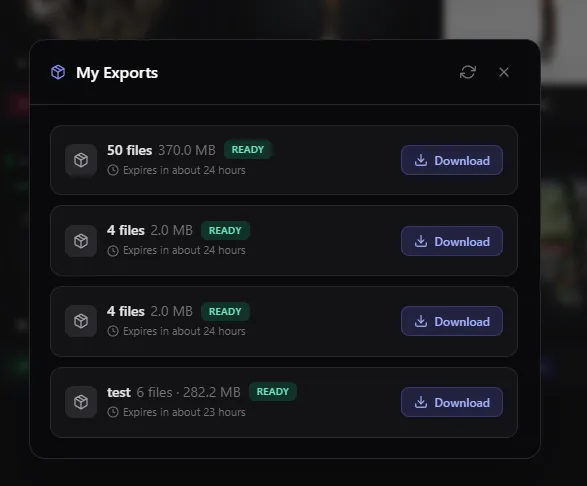
The My Exports button in your Dashboard header shows everything in one place:
- A live progress bar while an export is being prepared (you can cancel anytime)
- A spinner on the button while an export runs, and a green dot when one is ready that you haven't seen yet
- Download links for every export that's still within its link duration
You don't need to keep the page open - start an export, keep working, and come back for it (or let the email find you).
Good to know
- Each export can contain up to 50 files
- Each export costs 1 credit. If an export fails or you cancel it, the credit is refunded automatically
- If some selected files are no longer available, the export still completes with everything else - the archive includes a note listing what was skipped
- Once a download link expires, the ZIP is gone for good. Your original files stay untouched in your Dashboard - just export them again if you need a new link
- 3D models that were exported as OBJ or FBX bundles (mesh + textures) stay bundled inside the archive
Related Tools
- Choosing the right 3D file format? See Export & Formats
- Convert models before exporting with Format Conversion
- Build automated pipelines that end in a ZIP with Flow
Frequently Asked Questions
Open your Dashboard, select the models you want (selections work across pages), and click Export ZIP. You'll get a single archive with everything inside - up to 50 files per export.
You choose when you create the export: 1 day or 30 days. After that the link expires, but your files stay in your Dashboard and you can export them again anytime.
Yes. Choose "Folders by type" to split 2D, 3D, and video into separate folders, "Folders by format" to group by file type (glb, png, mp4, ...), or "Folders by date" to group by creation day.
Each export costs 1 credit, regardless of how many files it contains. If the export fails or you cancel it, the credit is refunded automatically.