Image Studio Overview
Overview of Image Studio, your all-in-one workspace for AI image generation, editing, conversion, and more. 100+ tools, 15+ AI models, all in your browser.
Image Studio is your all-in-one workspace for creating, editing, and converting images with AI. It includes over 100 tools powered by 15+ AI models, and everything runs in your browser. You can generate images from text, edit photos with natural language, convert images into different art styles, and much more.
Whether you are creating concept art, preparing images for 3D conversion, or just experimenting with different styles, Image Studio is the place to do it.
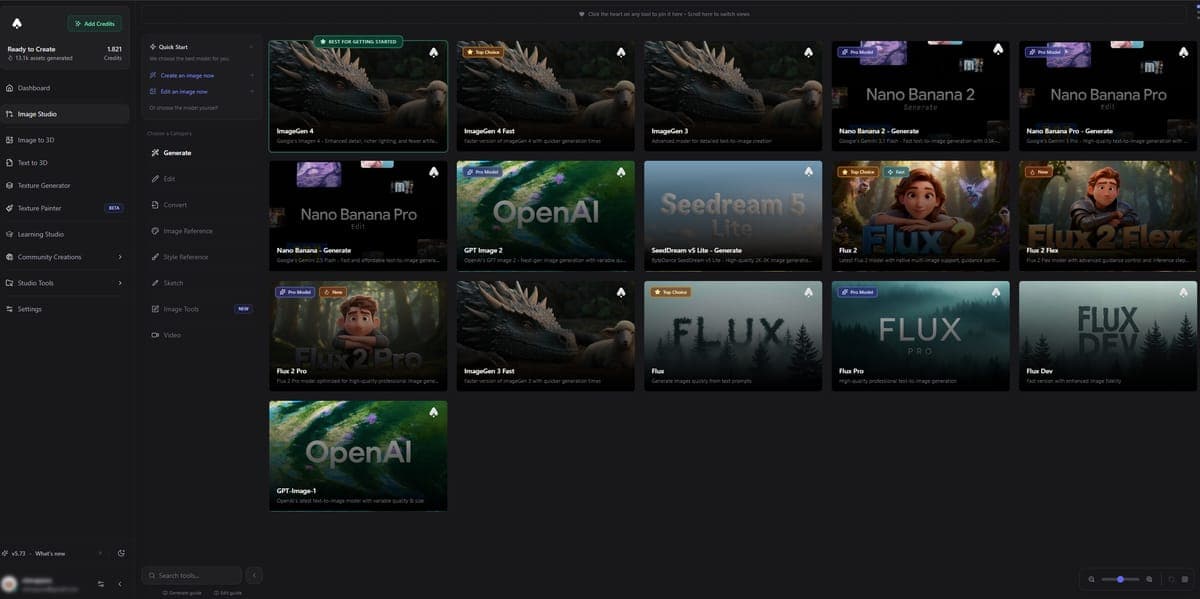
Categories
Image Studio organizes its tools into nine categories:
| Category | What it does |
|---|---|
| Generate | Create images from text prompts using 15+ AI models. |
| Edit | Modify existing images with AI. Describe what to change in plain text. |
| Convert | Transform images into different art styles like anime, oil painting, pixel art, and more. |
| Image Reference | Use reference images to guide generation. Keep styles, colors, and compositions consistent across images. |
| Style Reference | Apply the visual style of one image to another. Great for maintaining a consistent look across a project. |
| Sketch | Turn rough sketches into polished images, or draw directly in the built-in sketch painter. |
| Utilities | Practical tools like background removal, upscaling, and image-to-prompt. |
| Video | Turn static images into short AI-generated videos. |
| Train | Train custom AI models on your own images for personalized generation. |
Keyboard Shortcuts
These shortcuts work anywhere inside Image Studio:
| Shortcut | Action |
|---|---|
Ctrl+Enter / Cmd+Enter | Generate image |
Ctrl+L | Open Prompt Library |
Ctrl+S | Save current prompt to library |
Ctrl+P | Open AI Prompt Helper |
Ctrl+V | Paste image from clipboard |
B | Toggle sidebar |
Prompt Library
The Prompt Library lets you save, organize, and reuse your prompts across all Image Studio tools.
- Save any prompt you write and come back to it later.
- Organize with collections and tags so you can find prompts quickly as your library grows.
- Use templates with variables like
{{color}}or{{style}}to create reusable prompt structures. Swap out the variable each time you use the template. - Prompts are shared across all tools, so a prompt you saved in Generate works in Edit, Convert, or anywhere else.
Open the Prompt Library anytime with Ctrl+L.
AI Prompt Helper
Not sure what to write? The AI Prompt Helper writes and improves prompts for you. Open it with Ctrl+P, describe what you want in a few words, and the AI will expand it into a detailed, effective prompt tailored to the model you are using.
You can also paste in an existing prompt and ask the AI to improve it, make it more detailed, or adjust the style.
Next Steps
- Generate images from text
- Edit images with AI
- Convert images to different styles
- Character Sheet Generator
- AI Video Generation
- Pose Transfer
From Image to 3D Model
Image Studio works great as a first step before 3D conversion. Generate or edit a clean reference image, then send it to Image to 3D to create a full 3D model. See the Recommended Workflow for step-by-step examples.
Frequently Asked Questions
Image Studio is the AI image workspace inside 3D AI Studio. It includes over 100 tools for generating, editing, converting, upscaling, and animating images, all powered by 15+ AI models from Google, OpenAI, Black Forest Labs, and ByteDance. Everything runs in your browser with no software to install.
Unlike Midjourney (Discord-based) or DALL-E (single model), 3D AI Studio's Image Studio gives you 15+ models in one interface so you can pick the best model for each task. It also includes editing, style conversion, video generation, and direct 3D model conversion, making it a complete pipeline rather than just a generator.
3D AI Studio gives you free credits on signup that work across all Image Studio tools. Free users can access most generation models, conversion styles, and utilities. Paid plans add more credits, higher resolutions, video generation, and download access for tools like Character Sheet and Pose Transfer.
Yes, that is one of the primary workflows. You can generate or edit an image in Image Studio, then send it directly to Image to 3D with one click. 3D AI Studio's Image Studio includes utilities like background removal and lighting restoration specifically designed to prepare images for clean 3D conversion.
Yes. 3D AI Studio's Image Studio has keyboard shortcuts for all common actions. Press Ctrl+Enter to generate, Ctrl+L to open the Prompt Library, Ctrl+S to save a prompt, Ctrl+P for the AI Prompt Helper, and Ctrl+V to paste an image from your clipboard. Press B to toggle the sidebar.
Image Studio in 3D AI Studio includes models from Google (ImageGen 4, Nano Banana series), Black Forest Labs (Flux 2, Flux 2 Pro), OpenAI (GPT Image 2), and ByteDance (SeedDream). Each model has different strengths, from photorealism to text rendering to speed, and costs between 2-20 credits per generation.