Character Sheet Generator
Generate multi-view character turnaround sheets from a single image. Get front, left, right, and back views for game dev, 3D modeling, and animation reference.
Upload a single character image and get a 4-view turnaround sheet showing front, left, right, and back views. Then split the grid into individual panels for use as 3D modeling reference, game assets, or animation prep.
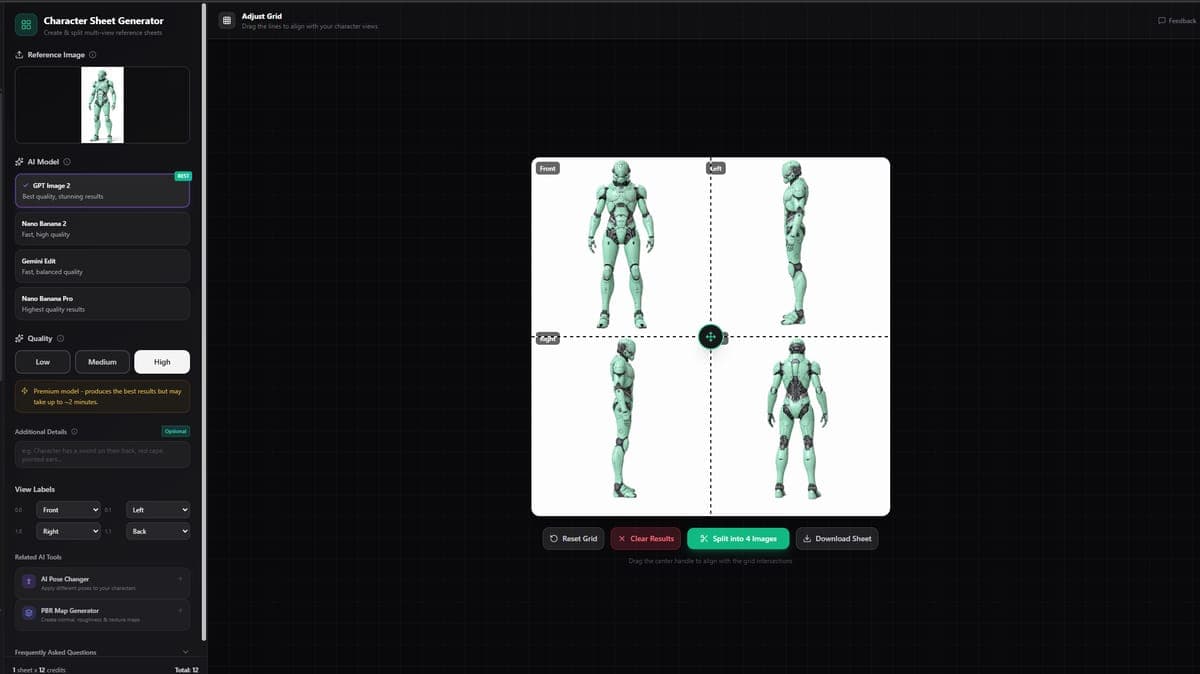
What It Does
The Character Sheet Generator takes one image of a character and produces a grid showing the character from four angles. This is the standard format used in game development and animation for character turnarounds.
The AI maintains the character's appearance, proportions, and details across all views, giving you a consistent reference sheet from a single input.
Available Models
| Model | Credits | Notes |
|---|---|---|
| GPT Image 2 | 6 (medium quality) | Default, most consistent results |
| Nano Banana 2 | 4 | Fast and affordable |
| Gemini Edit | 4 | Good color accuracy |
| Nano Banana Pro | 6-12 | Higher resolution options |
Settings
- AI Model - Choose which model generates your sheet.
- Quality (GPT Image 2 only) - Low, medium, or high detail.
- Resolution (Nano Banana Pro only) - Control output image size.
- Additional Details - Text field for extra instructions. For example: "fantasy armor", "casual clothing", or "simple flat colors."
Grid Splitter
After generation, the built-in grid splitter lets you break the turnaround sheet into individual panels:
- Drag the split lines to align with the boundaries between views.
- Relabel views if needed (front, left, right, back).
- Export individual panels as separate JPEG files.
This saves you from having to manually crop the output in an image editor.
Access
Free users can generate character sheets to preview the results. A paid plan is required to download the output images.
Great For
- Game development - Character turnarounds are the standard reference format for 3D character artists.
- 3D modeling reference - Pin each view beside your viewport while sculpting or modeling.
- Animation prep - Consistent multi-angle reference helps keep characters on-model across frames.
- Concept art - Quickly explore how a character looks from all sides before committing to a full design.
Related Tools
- Use character sheet views as multi-view input for Image to 3D with multi-image models for more accurate 3D characters
- Need to rig and animate the resulting 3D character? Use Rigging & Animation
- Want to change character poses first? Try Pose Transfer
Frequently Asked Questions
A character turnaround sheet shows the same character from four angles: front, left, right, and back. It is the standard reference format used in game development and animation. In 3D AI Studio, the Character Sheet Generator creates this automatically from a single image, keeping appearance and proportions consistent across all views.
In 3D AI Studio, character sheet generation costs 4-12 credits depending on the model. Nano Banana 2 and Gemini Edit cost 4 credits each for fast results. GPT Image 2 costs 6 credits at medium quality and delivers the most consistent multi-view output. Nano Banana Pro ranges from 6-12 credits for higher resolution options.
Yes, that is one of the primary use cases. After generating a turnaround sheet in 3D AI Studio, use the built-in grid splitter to export individual view panels. Pin each view beside your 3D viewport while sculpting. You can also feed the split views directly into multi-view Image to 3D models for AI-generated 3D characters.
Free users can generate character sheets to preview the results and see all four views. However, 3D AI Studio requires a paid plan to download the output images. This lets you test the tool and check quality before committing to a subscription.
Utilities
Practical image tools including background removal, upscaling, cropping, and lighting restoration. Prepare your images for 3D conversion or clean them up for any use.
AI Pose Transfer
Transfer poses onto characters using AI. Upload a photo, pick a pose from the library or upload your own, and generate the character in the new pose.