AI Pose Transfer
Transfer poses onto characters using AI. Upload a photo, pick a pose from the library or upload your own, and generate the character in the new pose.
Upload a character or person image, choose a target pose, and the AI generates your subject in that new pose while keeping their appearance intact. Pick from 21 preset poses or upload a custom pose reference.
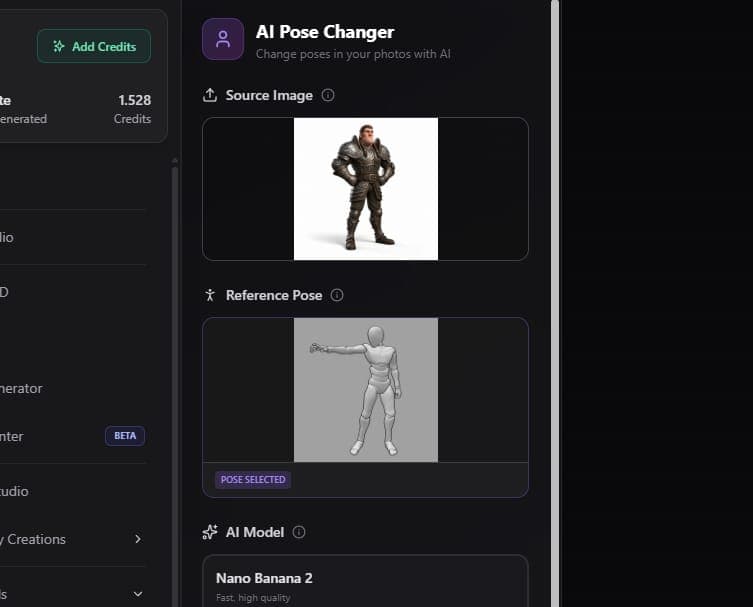
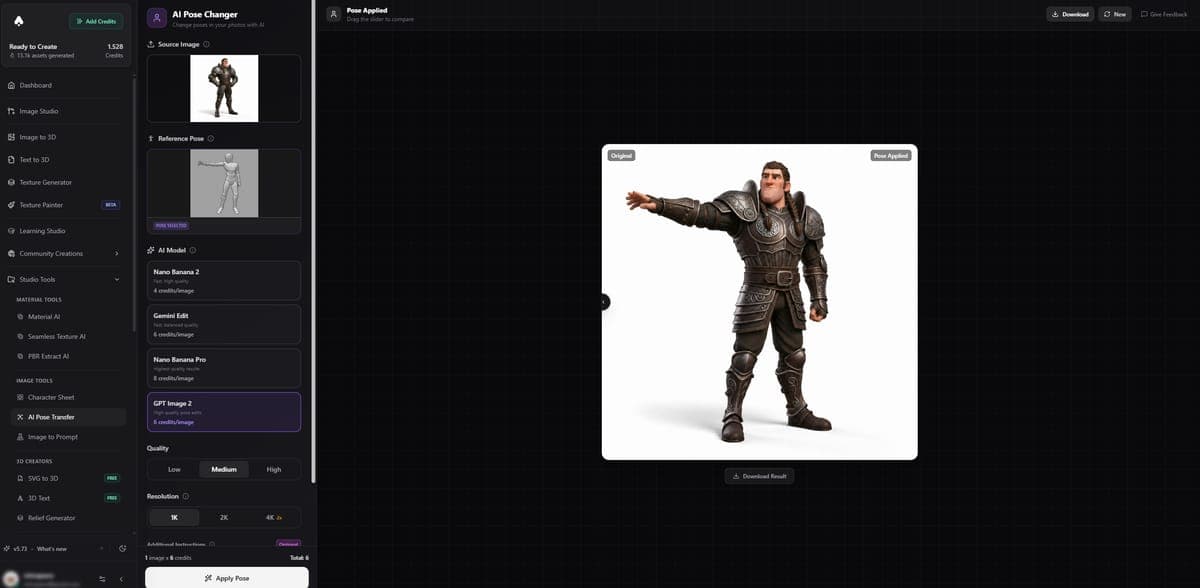
How It Works
- Upload your image - A photo or illustration of a character or person.
- Pick a pose - Choose from the pose library or upload your own reference image showing the desired pose.
- Select a model and click Generate.
- Compare results using the before/after slider.
The AI keeps the subject's face, clothing, body type, and details consistent while repositioning them into the target pose.
Available Models
| Model | Credits | Notes |
|---|---|---|
| GPT Image 2 | 6 | Default, best consistency |
| Nano Banana 2 | 4 | Fast and affordable |
| Gemini Edit | 6 | Good detail preservation |
| Nano Banana Pro | 8-16 | Higher resolution |
Pose Library
The built-in pose library includes 21 preset poses covering common positions like standing, sitting, action poses, and casual stances. You can favorite poses you use often for quick access.
If the library does not have what you need, upload any image as a custom pose reference. The AI will extract the body position from your reference and apply it to your subject.
Results
Generated images include a before/after comparison slider so you can quickly see how the pose changed relative to the original. You can download the result or send it to other Image Studio tools for further editing.
Access
Free users can generate pose transfers to preview the results. A paid plan is required to download the output images.
Great For
- Character design - Explore how a character looks in different poses without redrawing.
- Social media content - Create dynamic variations of product shots or portraits.
- Product photography - Repose mannequins or models without reshooting.
- 3D reference - Generate specific poses as sculpting or modeling reference.
Related Tools
- Need multi-angle views of a character? Use the Character Sheet Generator
- Ready to convert to 3D? Send your posed image to Image to 3D
- Want to rig and animate a 3D character? Use Rigging & Animation
Frequently Asked Questions
AI pose transfer takes your original character image and a target pose reference, then generates the character in that new position. The AI in 3D AI Studio preserves the subject's face, clothing, body type, and details while repositioning them. It uses advanced image understanding to figure out how each body part should look from the new angle.
Yes. Beyond the 21 preset poses in 3D AI Studio's pose library, you can upload any image as a custom pose reference. The AI extracts the body position from your reference and applies it to your subject. A photo of a person, a stick figure, or even a screenshot from a video all work as pose references.
In 3D AI Studio, pose transfer costs 4-16 credits depending on the model. Nano Banana 2 is the cheapest at 4 credits. GPT Image 2 and Gemini Edit cost 6 credits each and offer the best consistency. Nano Banana Pro ranges from 8-16 credits for higher resolution output.
Clear, well-lit images of characters or people against simple backgrounds produce the best results in 3D AI Studio. Full-body shots work better than cropped images since the AI needs to see the whole figure to repose it. Both photos and illustrations work, though illustrated characters with clean outlines tend to maintain consistency better across poses.
Character Sheet
Generate multi-view character turnaround sheets from a single image. Get front, left, right, and back views for game dev, 3D modeling, and animation reference.
Image to Prompt
Upload an image and get a detailed text prompt that describes it. Use the output to recreate similar images in AI generators or learn how to write better prompts.