Export a Painted Model
How to download a painted model from the Texture Painter: GLB with or without PBR materials, smaller GLBs, OBJ, STL and PNG textures, export texture sizes from 1K to 12K, texture padding, saving to your dashboard, and using the result in Blender, Unity and Unreal.
When your model looks right, download it with its painted texture, or save a copy to your dashboard. This page explains every export option, which one to choose, and how to bring the result into other apps. All exports are free.
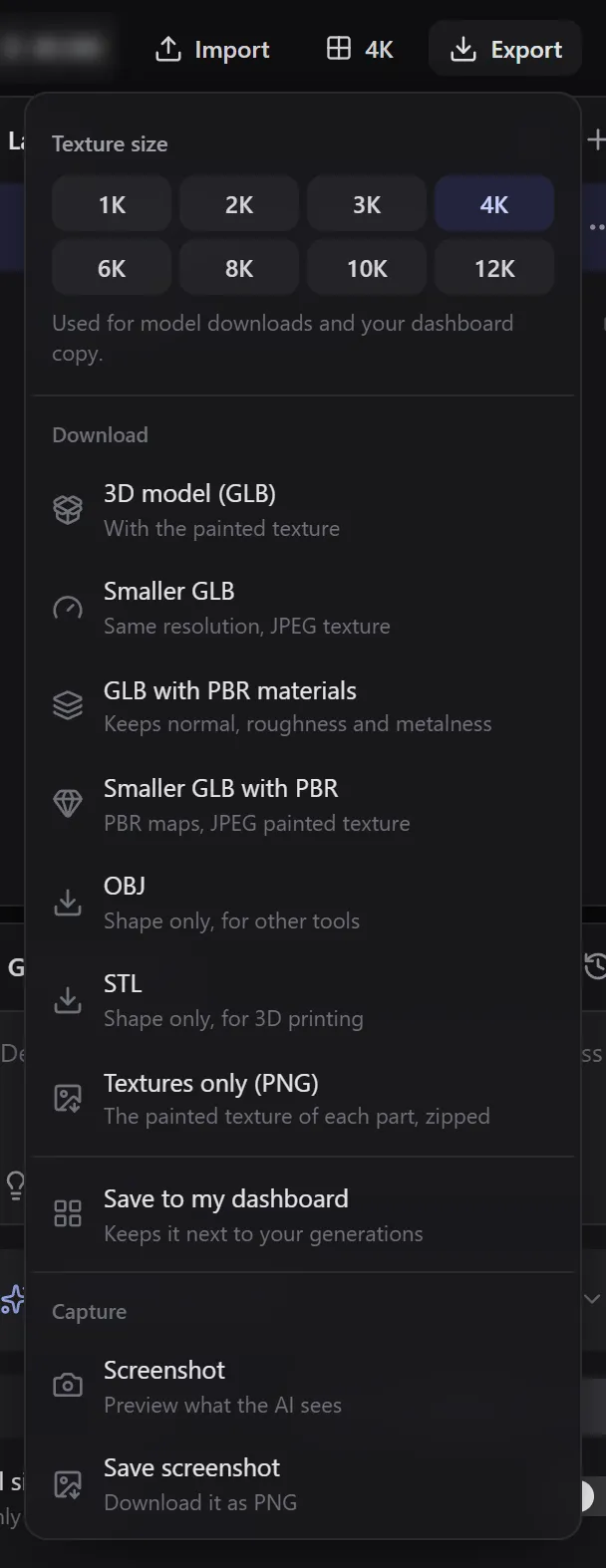
Pick a texture size
The Texture size row at the top of the menu sets the size of the exported texture: 1K, 2K, 3K, 4K (default), 6K, 8K, 10K or 12K.
This is separate from the texture size you paint at (1K to 8K, in the top bar). You can paint at 4K and download at 8K or 12K.
- At 4K or below, the size is used for downloads and for your dashboard copy.
- Above 4K, the download uses your size and the dashboard copy is saved at 4K.
Large 8K and 12K exports can take a few seconds. Keep the tab open until the download starts.
Padding
A texture is cut into pieces, one per part of the model's surface (its UV islands). The space between the pieces is empty. Games and other apps read smaller copies of the texture when the model is far away, and those copies mix the empty space into the edges of the pieces. Without padding, the model shows thin dark lines along its seams from far away.
Padding fills that space with the colours at the edges of the pieces. The Padding row in the Export menu, under Texture size, has four options:
| Option | What fills the space between pieces | Use it for |
|---|---|---|
| Infinite (default) | Each piece's edge colours, stretched until they meet the next piece | Games, engines and most apps |
| Limited | Edge colours for the Distance you set (1 to 64 px), then transparent or a colour you pick | Apps or pipelines that ask for a fixed padding |
| Smooth | Edge colours for the Distance you set, then a soft blend of the colours around | Textures you want to look calm in an image editor |
| None | Nothing: the space stays as you painted it | When another tool adds padding for you |
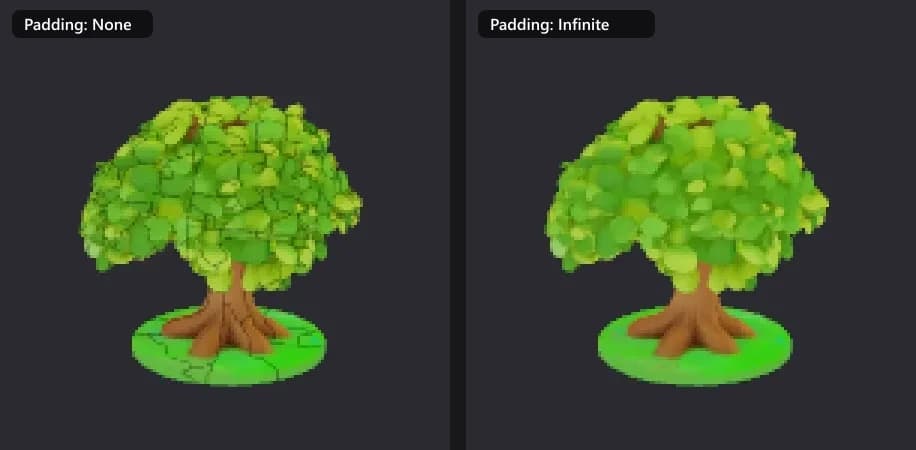
- Padding never changes what you painted on the model. Only the empty space between pieces changes.
- Your choice is remembered for your next exports.
- The padding is made at the export size, so it is just as clean at 1K as at 12K.
- The space stays opaque, unless your model uses transparency or you pick Limited with transparent. JPEG textures (the smaller GLBs) have no transparency, so transparent space shows as black there.
- Padding applies to every texture in the download: the painted texture and, with GLB with PBR materials, the normal, roughness and metalness maps when they are resized.
The painter pads the texture you see while you paint the same way as Infinite. If you paint right next to a seam, the far parts of the padding catch up a moment after you stop.
Pick a format
| Format | What you get | Use it for |
|---|---|---|
| 3D model (GLB) | The model with the painted texture | The safe default for most apps and the web |
| Smaller GLB | Same resolution, JPEG texture | Web, AR and sharing, where file size matters |
| GLB with PBR materials | Also keeps normal, roughness and metalness maps | Blender, Unity, Unreal and other engines |
| Smaller GLB with PBR | PBR maps with a JPEG painted texture | Engines, with a smaller file |
| OBJ | The shape only | Other tools that only need the mesh |
| STL | The shape only | 3D printing |
| Textures only (PNG) | The painted texture of each part at your texture size, padded, zipped | Applying the texture to the model yourself |
Downloaded files are named after the model, with the date and time added.
Save to your dashboard
Save to my dashboard keeps a copy next to your generations, named after the model with (Texture Painter) added. From the dashboard you can use it with other 3D AI Studio tools. The dashboard copy is a smaller GLB with a JPEG texture.
Capture a screenshot
Under Capture, Screenshot shows a preview of what the AI sees, and Save screenshot downloads it as a JPG.
Use the result in other apps
- Blender, Unity, Unreal, Godot, Maya: download GLB with PBR materials and follow the Integrations guide for your app: Blender, Unity, Unreal.
- Web and AR: use Smaller GLB.
- 3D printing: download STL for the shape, or use Export for 3D Printing for colour prints.
All formats are compared in Export formats.
Related
Frequently Asked Questions
3D model (GLB) for most uses. Choose GLB with PBR materials for game engines and Blender, Smaller GLB for the web, and STL for 3D printing.
Yes. The export texture size goes up to 12K, separate from the painting size. Painting at a higher size gives sharper detail to start from.
The empty space between the pieces of the texture shows through when the model is far away. Export with Padding set to Infinite (the default) and the lines go away.
No. Every export and Save to my dashboard is free.
Time-lapse videos
Turn a Texture Painter cloud session into a shareable MP4: the painter records your model from the front and back while you work, and renders a time-lapse in square, 16:9 or 9:16 for Reels and TikTok.
Shortcuts and gestures
Every Texture Painter keyboard shortcut and every mouse, trackpad, touch and pen gesture on one page, for Windows and Mac.