Texture Painter Time-lapse
Turn a Texture Painter cloud session into a shareable MP4: the painter records your model from the front and back while you work, and renders a time-lapse in square, 16:9 or 9:16 for Reels and TikTok.
Show how your model came to life. While you paint, the Texture Painter records your model from fixed front and back cameras, so the video stays steady however you move around while working. This page explains how recording works and how to make the video.
Time-lapse videos are available for cloud sessions on paid plans. Recording starts on its own; there is nothing to turn on.
How recording works
- About once a minute while you are painting, the painter captures the model from the front and from the back at 1500 × 1500 pixels.
- Nothing is recorded while you are idle or the tab is in the background, so the video only shows real progress.
- A session keeps up to 250 frames. For long sessions, older frames are thinned out evenly, so the video still covers the whole process.
- Frames belong to the session: duplicating a session starts a fresh recording, and deleting a session deletes its frames.
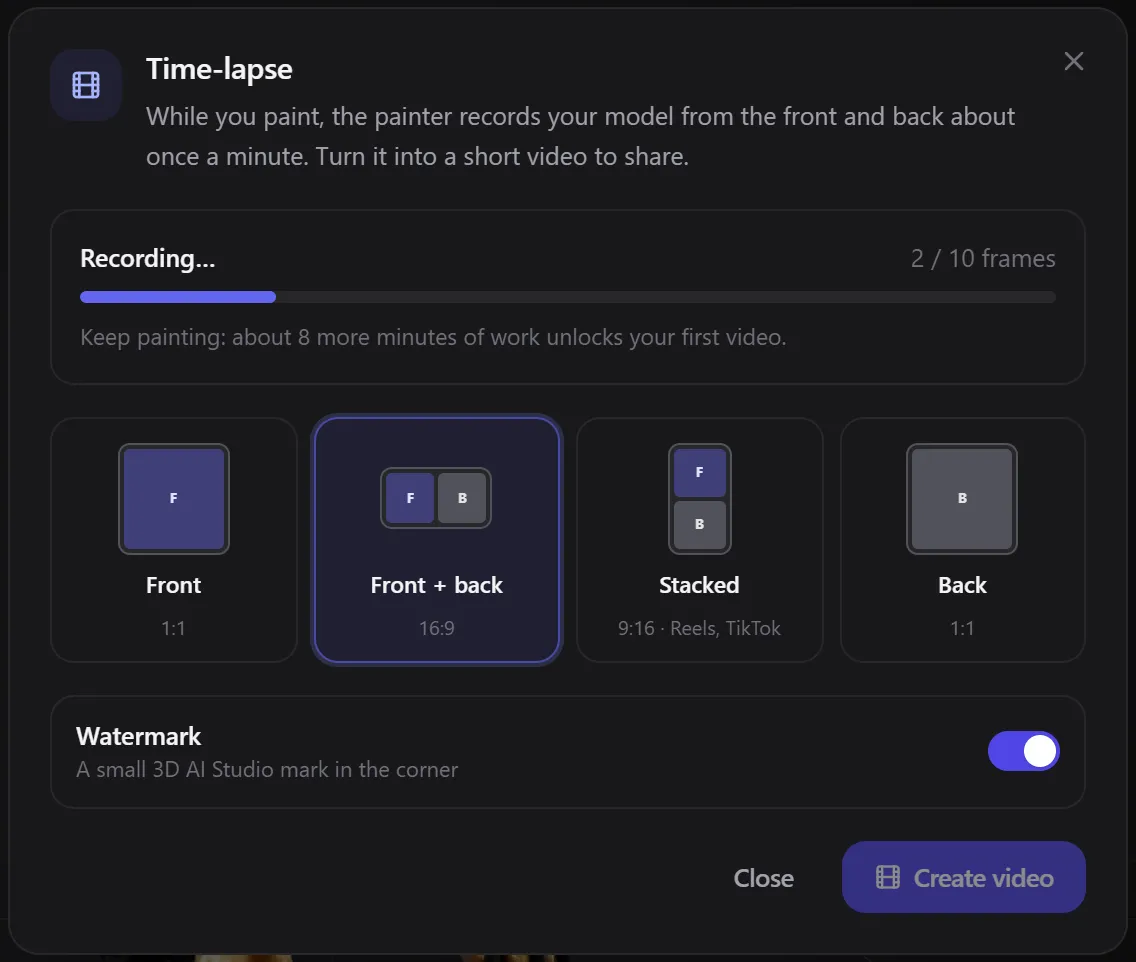
You need about 10 minutes of painting (10 frames) before the first video can be made. Until then, the dialog shows Recording… with the number of frames so far.
Create a video
Open Time-lapse video
Click the session name at the top left and choose Time-lapse video. You can also open it from a session's ⋯ menu on the start screen, or from the film icon next to Continue.
Pick a layout
| Layout | Shape | Best for |
|---|---|---|
| Front | Square (1:1) | Posts and portfolios |
| Front + back (default) | Wide (16:9) | YouTube, X, presentations |
| Stacked | Tall (9:16) | Reels, TikTok, Shorts |
| Back | Square (1:1) | When the back is the interesting side |
Leave Watermark on to add a small 3D AI Studio mark in the corner, or turn it off.
Create and share
Click Create video. A final frame of what is on screen right now is added, and the video renders on our servers, usually in under a minute. You can keep painting meanwhile.
When it is ready you can play it, Change layout, Share it (the caption is copied for you) or Download MP4. The video link stays available for 24 hours; download it to keep it.
Related
Frequently Asked Questions
No. Frames are captured only while you pause between strokes, at most about once a minute, and uploaded in the background.
A little: a full recording is usually 30 to 80 MB. Frames are never allowed to fill your storage completely, so they can never stop your painting from saving.
Yes, as long as it was painted as a cloud session on a paid plan. Open it from the start screen and choose Time-lapse video.
Saving and sessions
How the Texture Painter saves your work: autosave, the save status, the start screen, cloud sessions on paid plans and browser sessions on the free plan, version history, trash, several devices and teammates, and opening a model from your dashboard.
Export
How to download a painted model from the Texture Painter: GLB with or without PBR materials, smaller GLBs, OBJ, STL and PNG textures, export texture sizes from 1K to 12K, texture padding, saving to your dashboard, and using the result in Blender, Unity and Unreal.